Witty Technologies provides SAP FICO S4 HANA Training with Placement in Chennai. We also ensure 100% Job assistance for students in Chennai, Tambaram & Chengalpattu region. We provide SAP FICO online training in chennai and also provide SAP FICO offline training in chennai.

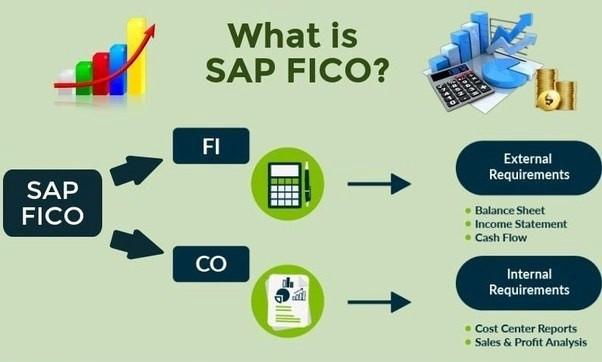
1. SAP FICO is Both Finance and Controlling Module. Here FI stands for Financial Accounting and CO stands for Cost Controlling.
2. FI is the most important module in SAP ERP. It is used to record the financial data of an organization.
3. It also helps to know the financial condition of the company.
4. It provides various job opportunities which starts at End-User without certification, Consultant & Experts with Certification, in and around Chennai.
5. Currently,SAP serves more than 320,000 businesses across 180+ countries, with over 90% of Fortune 500 companies using its solutions to manage key business processes. The company has a massive cloud user base of over 300 million subscribers and supports over 83,000 customers specifically with SAP Business One.
6. Our SAP FICO course provides, the Exact skills required for placement and necessary guidance for a successful interview.
Free Global exam model question paper with practice link.
1. Prakash P B.COM. B. ED., MBA.,
2. Total Work Experience is about 16 years. In that 12 Years in Accounting field and worked as Accounts Manager in Aditya Birla Money Limited, Also worked as Assistant Accounts manager in Hitachi payment service p ltd for 7.5 years Handling SAP FICO in HITACHI.
3. Nearly 4years of Experience in Teaching field as Tally Prime, SAP FICO S4 HANA & MM Faculty.
3. Raised a book of SAP FICO/MM.
4. Experienced More than 700 students in Tally Prime, SAP FICO S4 HANA & MM.
6. Worked in Anudip foundation as trainer while working For Tamilnadu Region and has been Nominated as Top faculty of the year Award 2022-23. And scored almost 81% of Mark in teaching
Accounting definition – Bookkeeping – Accounting cycle – Financial statement – Double entry system of bookkeeping – Chart of Accounts (COA) – Salient features of COA – Branches of Accounting – Accounting Methods – Types of Provision – Accounts Groups – Debtors & Creditors – Accounts Principles – GAAP – Golden rules of Accounting – Simple Entry – GST – GST Return – Types of GST – Normal Tax payer vs Composite tax payer – Export & Imports – TDS – Nature of service – Recipient – Form 16A – 26AS
General Ledger Account Groups - Field status variant - General Ledger account
Customer Account Group - Range Maintenance – Customer - Define Number Range for BP - Define grouping and assign number ranges - Define number assignment for direction BP to Customer.
Create Document Type - Change Document Type - Create Range Maintenance – Accounting Document - Create Credit Control Area - Tolerances for Groups of G/L Accounts in Local Currency to Company Code - Create Customer/Vendor Tolerances to company code - FI Tolerance groups for Users to Company code - Maintain Accounting configuration for Special GL Indicator.
Goods and Services Tax (GST) Introduction - Check Calculation procedure - Tax Processing in Accounting - Check Calculation procedure - Assign Country to Calculation Procedure - Define Tax codes for sales and purchases - Create GL Account - GL Account key to GL - Maintain company code settings.
Provide Access to create a Bank Account - Create Bank Account - Display G/L Account Centrally - Manual Bank Statement Transaction - Define Posting keys and Posting rules for Manual bank statement - Create Manual Bank Statement - Define Variants for Manual Bank Statement.
Create document type - Create Recurring Document - Recurring document list.
Maintain FI Configuration – Automatic Procedure (OBXK)
All Company Codes - Paying Company Codes - Payment Method in Country - Payment Method in Company Code - Bank Determination – Ranking Order - Bank Accounts - Available Amounts - Value Date - Change Vendor Master - Cheque Lot
Maintain Business Partner (BP) - Enter Customer Invoice - Credit Memo - Customer Balance Display - Customer Line-Item display - Incoming Payments - Customer Clear.
Create Asset - Acquisition from purchase W. Vendor - Depreciation run - GL Account line-item Balance - Asset Balance - Change Control of reconciliation account - Enter G/L Account Document - GL Account line-item Balance.
Create Recurring Document - Recurring document list - Recurring document Execute - Batch Input - Session overview.
Maintain Business Partner (BP) – Bank ID - Vendor Invoice - Automatic payment transactions - G/L Account line-item display.
Display document - Standard Hierarchy - Cost centers Actual/Plan/Variance - Display Actual Cost line items for cost centers - Table view.
Company code – Internal trading Partner – Business Area – Fiscal Year variants – Chart of accounts – Profit and Loss Accounts - Create Posting period – Define Variants - Create Posting Periods – Specify Time Intervals.
Vendor Account Groups - Create Range Maintenance to Vendor account groups - BP Role - Number range Intervals - grouping and assign number ranges - number assignment for direction BP to vendor
Define Accounting Principles - Assignment of Accounting principle to ledger group - Define Settings for Ledgers and Currency types - General Table display.
Taxation - Tax deducted at Source (TDS) & Goods & Service Tax (GST) - Activate Extended withholding Tax - Define withholding tax type for invoice posting - Define withholding tax keys - define withholding tax codes - Check Recipient Types - Assign withholding tax types to company code - Maintain Countries - Define formulas for Calculating Withholding Tax - Define Accounts for Withholding tax to be paid over - Define Accounts for Withholding tax for “Gross.up” offsetting entry - Define min/max amounts for withholding tax types - Define min/max amounts for withholding tax codes - Screen Sequence Control (OMT3E).
Create Controlling area - Assignment of company code - Set Controlling Area - Define ledger for CO Version - Activate Profit center Accounting in controlling area - Define profit center standard hierarchy in controlling area - Run Project for updating existing journal entries - Set Controlling Area - Create a Standard Hierarchy - Cost Center Categories - Create Profit Center Group - Maintain controlling area settings - Create Dummy profit center - Change profit center - Set control parameter for actual data - Maintain version - Maintain number range for local document - Create cost center - Create GL Account - Maintain automatic account assignment of revenue elements - Choose Accounts - Range maintenance for co documents - Cost Center Overview.
Copy Reference Chart of Depreciation - Specify Description of Chart of Depreciation - click copy/delete depreciation area - Allocate co.cd > Non-Taxable transaction (OBCL) - Maintain company code in Asset accounting (OAOB) - Specify account determination - Create Screen layout rules - Define number range - Define Asset class - Assign Accounts for automatic posting - Specify rounding net book value for depreciation - Define Screen Layout for Asset Master data - Define Multi-level Method - Maintain depreciation key - Depreciation area - Generate Period Control Rules - Year-End Closing - Fiscal Year change – Balance carry forward – Central FI - Define Technical Clearing Account for Integrated Asset Acquisition.
Currency Translation Ratios - Currency Exchange Rates
Terms of Payment - Maintain FI Configuration: Automatic Posting Accounts.
Activate Document splitting - Maintain Business Partner (BP) - Maintain Business Partner (BP) – Alter - Assign Country to Calculation Procedure - Define settings for Ledgers and currency types - Deactivate a ledger for a company code - Enter Vendor Invoice - Display Document - Post/Delete Parked Document - Vendor Display Balance - Individual Reversal - Display/Change Line Items - Mass Reversal - Credit Memo - Maintain Business Partner (BP) – Block & Unblock - Enter Vendor Invoice - Vendor Display Balance - Vendor Payment – Post - Reset cleared items - Vendor Payment Clear - Down Payment - Vendor Display Balance.
Process Manual Accounts Statement - Bank Statement Postprocessing - GL Account line-item Balance.
Enter G/L Account Document - General Posting
Post Outgoing Payment
General Posting - GL Account line-item Balance.
Feeling inquisitive? Have a read through some of our FAQs or contact our supporters for help.
SAP FICO (Financial Accounting and Controlling) is a core module of SAP ERP used to manage financial data and cost control in organizations. Learning SAP FICO opens doors to high-paying roles in finance, accounting, and SAP consulting.
This course is ideal for individuals with a background in B.Com, MBA (Finance), CA, ICWA, or anyone with basic accounting and SAP knowledge.
No, prior SAP experience is not mandatory. We provide foundational training suitable for beginners and advanced learners.
The training typically lasts 10 - 11 weeks, depending on the mode (online/offline) and learning pace of the student
Yes, our training includes extensive practical sessions, assignments, and real-time projects to ensure you gain hands-on experience.
Yes, we provide comprehensive placement support, including interview preparation, resume building, and connecting you with job opportunities in top companies.
You can start as an SAP End-User, move to roles like SAP FICO Consultant, and grow into SAP FICO Expert positions. Freshers can earn starting salaries of ₹25,000–₹50,000 per month as per industrial standards, with higher pay for experienced professionals.
Yes, we offer flexible learning options, including online and offline classes. Online sessions require a laptop or computer with stable internet access.
Yes, all students receive a comprehensive handbook covering key concepts, configurations, and practical exercises.
Yes, upon successful completion of the course, you will receive a course completion certificate to add to your professional portfolio.